ForgePDF Try 14 days freeComing soon
The PDF editor for small businesses

Edit it. Sign it.In your own handwriting.

Contracts, quotes, invoices and forms, corrected and signed in your own handwriting, so every document looks like it comes from you. Client files stay on your device, and one licence covers everyone who uses it.

One licence, everyone on the deviceClient files stay on your deviceFree reader forever
ForgePDF with a rental agreement signed in handwriting: the place and date and the names of the landlord and the tenant
✍ Your handwritingLearned from your own handwriting
🔒 Stays on your deviceNo cloud, no account for your files
Drag to compare

Your document,without the sales pitch.

Most PDF software wants something from you while you work: a login, an upgrade, your files in their cloud. ForgePDF opens your document and lets you get on with your business.

Some standard PDF subscription
Home · Tools · Document Upgrade now
×Sign in to continueCreate a free account to edit this file.Sign in
×Save to the cloud?Store this document online so you can share it.Upload
×Your trial ends in 3 daysEach extra user needs their own subscription.
×AI assistantShall I read this document and summarise it for you?Yes, read it
×This tool is a Pro featureUpgrade to edit text in this document.See the price
ForgePDF
ForgePDF with a rental agreement open, and nothing else on the screen
⇆
Every employee needs their own subscription.

One licence covers everyone who uses the device.

I just want to sign a form, not create an account.

No account and no login. Your documents are ready when you are.

My signature always looks like a stamp.

Documents signed in your own handwriting look personal, every time.

I don't want client data in someone's cloud.

Your files never leave your device. Nothing is uploaded.

Only in ForgePDF

What the big namesdon't give you.

Everything you expect from a professional PDF editor, plus these, which the usual PDF software does not give your business.

Only ForgePDF
Your own handwriting

Quotes, contracts and forms that look written by you, not typed by a machine. Learned from your own handwriting and a little different every time, so every document feels personal.

Elsewhere: a few handwriting fonts
Only ForgePDF
One licence, everyone on the device

Does your team share a device at the front desk? One licence covers everyone who uses it, each with their own signature, settings and language. No subscription per employee.

Elsewhere: a subscription per person
Only ForgePDF
A window made of glass

A calm, modern workspace in your own colour, easier on the eyes through a long day of paperwork. Try it below.

Elsewhere: light or dark
By design
PDFs from strangers cannot harm you

Code hidden in a PDF is a common way into a business. ForgePDF never runs it, so an invoice from an unknown sender stays just a document, while your forms still add up their totals.

Elsewhere: hidden code runs unless switched off
By design
No cloud, no AI reading your files

Contracts, payslips and client details stay on your own device. Nothing is uploaded or handed to an AI, so you always know where your client data is.

Elsewhere: cloud storage and an AI assistant
Only ForgePDF
Every European language

Everyone on your team works in their own language: English and more than fifty European languages, from Dutch and Bulgarian to Welsh, Luxembourgish and Romansh. It starts in the language your device uses.

Elsewhere: the larger languages only
Try it yourself

Drag the glass. Pick your colour.

These are the real Glass and Colour sliders from ForgePDF's settings. Drag them here for a preview: in the application the whole window turns to glass, from solid grey to the screen behind glowing through, tinted any colour you like.
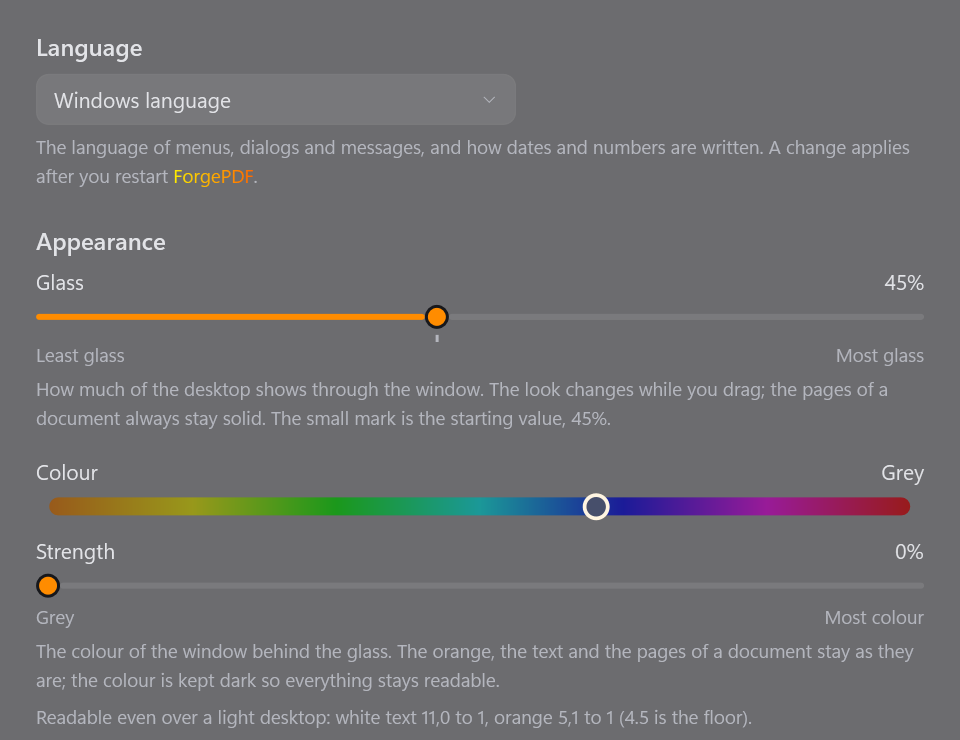
The Appearance settings of ForgePDF: the Glass slider and the Colour slider
Your handwriting

Write it once.Your hand, everywhere.

No font that everyone else has too. You write a few pages by hand, once, and ForgePDF learns how you write, so the documents you send look like they come from you, not from a printer.

  1. Print the handwriting pages

    ForgePDF prints five pages with a box for every letter, number and sign, and a few lines of words to copy.

  2. Fill them in by hand

    With your own pen, the way you normally write. No need to be neat: it should look like you.

  3. Scan them or take a photo

    With a scanner or your phone. ForgePDF learns your letters, your words and the way you join them, and you approve every one.

  4. Your hand on every document

    Signatures, notes, forms and whole paragraphs, with natural pen pressure and never two words exactly alike.

  5. Still searchable

    Search and copy keep working, because underneath it is the text you typed. Your styles stay on your device only.
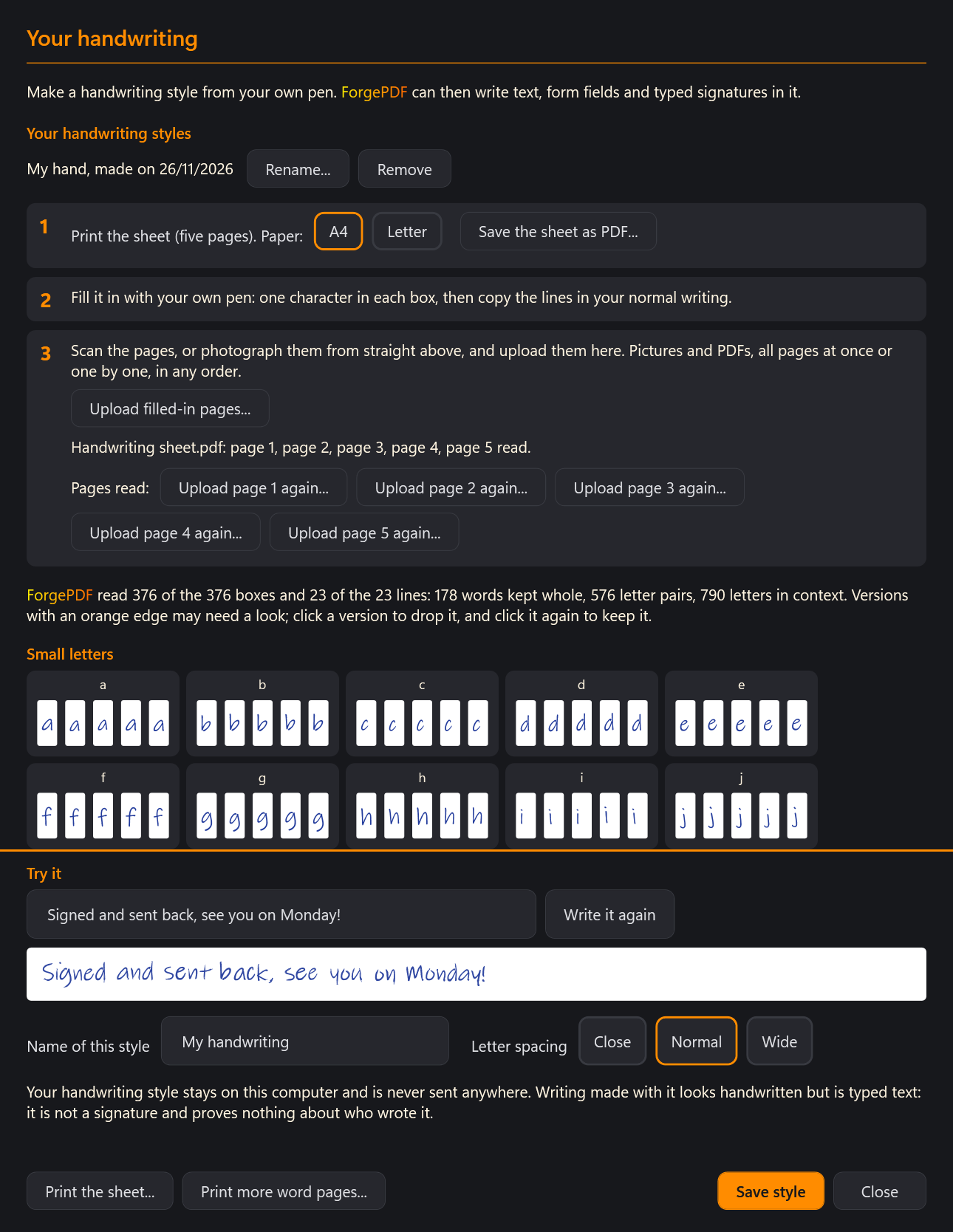
The handwriting window after the handwritten pages were read: every box and line read, the letters found, and a sentence written in the new style
What you get

Everything you do with a PDF.In six parts.

1

Edit

Fix a typo, a price or a date without going back to the original.

  • Correct any documentChange the words in the PDF itself, in its own font, and the page stays tidy
  • Fix old paperwork tooEven a scanned contract can be corrected, without a visible patch
  • Paragraphs in your own handwritingOnly ForgePDF
  • Update every mention at onceA new address or price, replaced throughout the document
  • Swap a logo or a photoPictures and drawings in the PDF, ready for the new version
  • Add notes and datesIn any language, including those written right to left
  • No embarrassing typosA spelling check, and white-out for what has to disappear
A paragraph opened for editing on the page, with the format bar above it

A paragraph being corrected: the rest of the page moves along neatly

2

Sign

Signed and sent before your coffee is cold.

  • Your signature, ready in secondsDrawn, typed or from a photo, where only the ink is kept
  • Signed in your own handwritingOnly ForgePDFNever twice the same, like a real pen
  • Forms ticked and initialledTicks, crosses and initials for every box
  • Signatures exactly where they belongStraight into the fields a form asks you to sign
  • Know a signed document is genuineWhether others' signatures are valid and the document unchanged
  • Honest by defaultOnly ForgePDFThe file notes which pages were written by hand, never who wrote them
The signature window: a name typed and shown in every handwriting style, your own first

Your name in every handwriting style, your own first

3

Create
and scan

From the paper pile to tidy, searchable PDFs.

  • Any document as a PDFWord, Excel, PowerPoint, photos and web pages, ready to send
  • PDFs straight from OfficeIncluding password-protected ones, without leaving Word, Excel or PowerPoint
  • Paper into PDFOne page or a whole stack in one go
  • Find anything in a scanScanned paperwork becomes searchable, editable text
  • Phone photos that look scannedA receipt photographed on the desk becomes a straight, clean page
  • Keep a web page as it wasA supplier's terms or a whole site, saved as a PDF
  • Back to Word or Excel when you need toA PDF turned into an editable document again
A photographed invoice in ForgePDF, which sees the page is a picture and offers to recognize its text

A photo of an invoice: ForgePDF spots it and offers to make it searchable

4

Pages

One tidy file instead of ten loose ones.

  • Everything for a client in one filePDFs, photos and Office documents, combined in your order
  • Send only what is neededA long file split by pages, by size or by chapter
  • Pages in the right orderTurned, removed, added or moved
  • A professional finishHeaders, footers and page numbers on every page
  • Marked as draft or copyWatermarks, backgrounds, and numbered pages for legal files
  • Spot what changed in a contractTwo versions compared, word by word
  • Attachments that always arriveLarge files made small enough to e-mail
Combine files: two PDFs, a Word document, a photo and an invoice in one list

PDFs, photos and Office files, combined into one

5

Protect

Client data stays private. What has to go, goes for good.

  • Only the right people can open itA password, and your choice whether it may be printed or copied
  • Personal details removed for goodBank account numbers, e-mail addresses and phone numbers found for you
  • Nothing hidden left behindOld versions, comments and hidden details cleared before you send
  • Safe with files from strangersA PDF from an unknown sender stays sealed off until you trust it
  • Hidden code never runsBy design
  • Nothing uploaded, everBy design
A payslip with the name, the bank account and the e-mail address marked for redaction

Three personal details marked, removed for good once applied

6

Forms
and review

Forms filled in, approvals on record.

  • Forms right the first timeTotals, dates and amounts calculated for you
  • Forms filled in your own handwritingOnly ForgePDFAnd they stay editable
  • Your own forms, ready to sendOrder forms, registrations and time sheets, from a template or from scratch
  • Clear approvalsStamps such as Approved, Paid and Received, and notes with replies
  • Easy to read for everyoneRead aloud, larger text and an accessibility check
  • Find any document in secondsEvery PDF in a folder searched at once
An order form filled in, its text fields in handwriting and the total calculated

An order form filled in your own handwriting, the total calculated

Every day, without noticing

The small things that make it yours.

Documents side by sideCompare a quote with its contract without switching back and forth
Nothing lostUnsaved work comes back after a crash or a power cut
See before you openEvery page previewed in your folders and your e-mail
Works the way you doKeyboard, touch and pen, and readable by a screen reader
Measure on drawingsDistances and areas on plans, to scale
Only the tools you useA toolbar you arrange yourself
Easy on the eyesGrey, not white, for long days
Always up to dateEach new version checked to be genuine before it installs
Every feature

The whole list.Nothing locked behind a Pro.

Every feature below is in the one licence, nothing extra to buy. Search for what you need.

AEveryday work

  • Opens every PDF, in any language
  • Several documents open as tabs
  • Recent documents always at hand
  • Pages shown the way you like to read
  • Full screen for presentations
  • Straight to any page
  • Asian, Cyrillic and right-to-left writing
  • Work back after a crash or power cut
  • Your own look: glass and colour
  • Previews in your folders and e-mail
  • Rulers and guides for neat layouts
  • Distances and areas measured on plans
  • Two parts of a document side by side
  • A toolbar with only your tools
  • More than fifty languages for your team
  • Keyboard, touch and pen

BMake PDFs

  • PDFs from photos and pictures
  • PDFs from Office documents, web pages and text
  • PDFs from anything copied or captured on screen
  • Whole websites saved as one PDF
  • PDFs straight from Word, Excel and PowerPoint
  • Password-protected PDFs straight from Office
  • PDFs from print files

CCorrect and update

  • The text itself corrected
  • The rest of the page moves along neatly
  • A word replaced throughout
  • Pictures, drawings and links swapped
  • Notes and dates added
  • A logo or photo added
  • What may not be seen, covered
  • Spelling check
  • Pages turned, removed, added, extracted and reordered
  • Blank pages and replacements
  • Title, author and other document details
  • How a document opens
  • Page transitions for presentations
  • Links, attachments, layers and bookmarks
  • Articles that read across columns
  • Maps with real-world positions
  • Repeated jobs done in one go

DPaper and scans

  • Paper scanned straight into a PDF
  • Searchable scans
  • Scans turned into editable text
  • One paragraph of a scan corrected
  • Phone photos of pages, straightened
  • Recognition in your team's languages

EForms

  • Forms that calculate for you
  • Forms filled in your own handwriting
  • Your own forms
  • Ready-made form templates
  • Barcodes on forms
  • Form answers in and out, or fixed for good
  • Older government forms too

FPages and files

  • Files combined into one
  • A long file split
  • Pages trimmed and resized
  • Headers, footers and page numbers
  • Watermarks and backgrounds
  • Page numbering for legal files
  • Several files bundled as one
  • Smaller files for e-mail

GReview and share

  • Notes with replies
  • Stamps such as Approved and Paid
  • Everyone's notes collected and summarised
  • What changed between versions
  • Text copied out of any PDF
  • Back to Word, Excel, PowerPoint, images or text
  • Saved as a web page
  • Saved as a print file

HProtect and sign

  • Password protection
  • Access for named people only
  • Your own protection rules
  • Files from strangers opened safely
  • Personal details removed for good
  • Hidden details cleared before sending
  • Hidden code never runs
  • Your signature in seconds
  • Initials and ticks
  • Your own handwriting
  • Others' signatures checked

IPrint and present

  • Print with a live preview, booklets and posters
  • Documents checked for accessibility
  • A logical reading order
  • Large, readable text in small windows
  • Read aloud
  • A document searched
  • A whole folder searched
  • Instant search across folders
  • Video, sound and 3D
  • Colours checked before printing
  • Professional print preparation
  • Archive-ready PDFs
  • Your own checks, run on whole folders
  • Colours that print true
Side by side

ForgePDF and the usual subscription.Honestly compared.

Where the others do it too, we say so.

ForgePDFSome standard PDF subscription
Who the licence coversEveryone who uses the deviceOne person
Write in your own handwritingLearned from your own handwritingNot available
Glass window and your own colourTwo sliders, liveLight or dark theme
Your files in the cloudNever, nothing is uploadedOffered throughout
An AI reading your documentsNeverAI assistant built in
Hidden code inside a PDFNever runsRun unless switched off
Edit text and paragraphsYesYes
Edit scanned textYes, without a visible patchYes
Removing personal details, passwords, opening unknown files safelyYesYes
Forms, notes, comparing versions, searchable scansYesYes
Digital certificate signaturesHandwritten-style signatures; checks others' certificatesYes
Free reader without a licenceYes, foreverYes, a separate app
Is it safe?

Safe, and you cancheck it yourself.

Every line written by us

Built from scratch by Forge Digital, with no borrowed code from unknown sources running on your devices.

Unknown files kept apart

A PDF from the internet or an unknown sender opens sealed off from your files and your network, until you trust it.

No hidden code

Code hidden inside a PDF never runs, and links show where they lead before they open.

Updates you can trust

Each new version is checked to be genuinely from Forge Digital before it installs.

What people say

Don't take our word for it.

★★★★★5 out of 5
I sign rental contracts every week. Now they look like I signed them with my own pen, because I did: a few pages by hand, once.
Sofie ClaesProperty manager, AntwerpSigns in her own hand
Four of us share the tablet at the counter. One licence, and everyone has their own signature and their own language. That alone saves us a fortune.
Thomas WeberBakery owner, GrazOne licence, four users
Patient letters stay in the practice. No cloud, no account, no assistant reading along. That is exactly what we need.
Dr. Elena PetrovaGeneral practitioner, PlovdivFiles stay local
I changed a price in a quote the client had already sent back as a scan. One paragraph, and nobody could tell it had been touched.
Marco BianchiKitchen fitter, MilanEdits scanned text
Before payroll goes to the accountant I redact every bank number in one go. It finds them all, and then they are gone for good.
Anna NowakOffice manager, WrocławRedacts in one go
The price

One price.Every feature, every user.

€4.99 a month
plus VAT
14 days freeCancel any time
Allusers on the device
90+features, nothing locked behind a Pro
∞free reader, also after your trial

You buy from inside the application: a secure checkout opens in your browser and everything unlocks by itself once paid.

ForgePDF is almost ready. Downloads open soon.

Moving to a new device? Sign in there and your licence moves with you.

Questions

What people ask us.

Does everyone in my business need their own licence?

No. One licence covers everyone who uses the device, each with their own settings, signature and language.

What happens after the 14 days?

During the 14 days you can try every feature; saving, printing or exporting your changes needs a licence. After that, ForgePDF stays a free reader forever: open, read, search, print and read aloud. Buy a licence and everything unlocks, with nothing to reinstall.

Are my documents uploaded anywhere?

No. ForgePDF works on your own device. It only contacts Forge Digital to check for a newer version, to renew your licence, and to send a problem report when you choose to. Your documents are never sent.

How real does my handwriting look?

It is made from your own letters, words and joins, with pen pressure and the drift of a real line, and no two words come out the same. It is still saved as real text, so search and copy keep working.

Is a signature from ForgePDF legally valid?

ForgePDF places a handwritten-style signature, like signing a printed page by hand. Where the law asks for a digital certificate signature, it can check one but does not create one.

Can I open the PDFs my clients and suppliers send?

Yes. ForgePDF opens every PDF, including forms, notes, layers and the older forms some governments still use.

Which devices does it run on?

Windows 10 and 11 today. The glass look needs Windows 11.

Can I move to a new device?

Yes. Sign in on the new device and, once you confirm, the licence moves there, up to twice in 12 months.

Ready when you are

Your documents.Your device. Your hand.

Download it tonight and try every feature for 14 days, free, your own handwriting included. Buy when you are ready to save your work.

Downloads open soon. Then try every feature for 14 days, free, your own handwriting included.